Migrating Files to a New Storage Location
Storage location migration lets you move files from one Synapse storage location
to another — for example, from Synapse-managed S3 (SYNAPSE_S3) to your own
S3 bucket (EXTERNAL_S3). The process is intentionally two-phase so you can
review exactly what will be moved before committing to the transfer.
This tutorial demonstrates how to index a folder's files and then migrate them to a new storage location using the Python client.
Read more about Custom Storage Locations Read more about setting up storage location
Tutorial Purpose
In this tutorial you will:
- Set up and get a project and folder
- Index files in a folder for migration to a destination storage location
- Review the index results CSV
- Migrate the indexed files
- Review the migration results CSV
Prerequisites
- Make sure that you have completed the Installation and Authentication setup.
- You must have a Project and a destination storage location already created. See the Storage Locations tutorial.
- Migration is currently supported only between S3 storage locations
(
SYNAPSE_S3andEXTERNAL_S3) that reside in the same AWS region.
How Migration Works
Migration is a two-phase process:
- Index — scan the project or folder and record every file that needs to move into a local SQLite database.
- Migrate — read the index database and copy each file to the destination storage location, updating the entity's file handle.
Separating the phases lets you inspect what will be migrated before committing to the move.
Warning: Migration modifies existing entities. Always run against a test project first and review the index results before migrating production data.
1. Set up and get project
import synapseclient
from synapseclient.models import Folder, Project

syn = synapseclient.login()
my_project = Project(name="My uniquely named project about Alzheimer's Disease").get()
2. Index and migrate files
Phase 1 scans the folder and records all files that need to move. The result is
a MigrationResult whose db_path points to the local SQLite database. Use
as_csv to export the index for review before proceeding.
Phase 2 reads the index database and performs the actual migration, returning
another MigrationResult. Set continue_on_error=True to record failures in
the database rather than aborting. Set force=True to skip the interactive
confirmation prompt.
# WARNING: This will actually migrate files associated with the project/folder.
# Run against a test project first and review the index (MigrationResult) before
# migrating production data.
my_migration_folder = Folder(
    name="my-data-migration-folder", parent_id=my_project.id
).get()
index_result = my_migration_folder.index_files_for_migration(
    dest_storage_location_id=MY_S3_STORAGE_LOCATION_ID,
    db_path="/path/to/your/migration.db",
    include_table_files=False,  # Set True if you also want table-attached files
)
index_result.as_csv("/path/to/your/index_results.csv")
print(f"Migration index database: {index_result.db_path}")
print(f"Indexed counts by status: {index_result.counts_by_status}")

migrate_result = my_migration_folder.migrate_indexed_files(
    db_path="/path/to/your/migration.db",
    continue_on_error=True,
    force=True,  # Skip interactive confirmation for tutorial purposes
)
migrate_result.as_csv("/path/to/your/migrate_results.csv")
if migrate_result is not None:
    print(f"Migrated counts by status: {migrate_result.counts_by_status}")
else:
    print("Migration was aborted (confirmation declined).")
Review the index CSV to confirm what was discovered before migration runs:
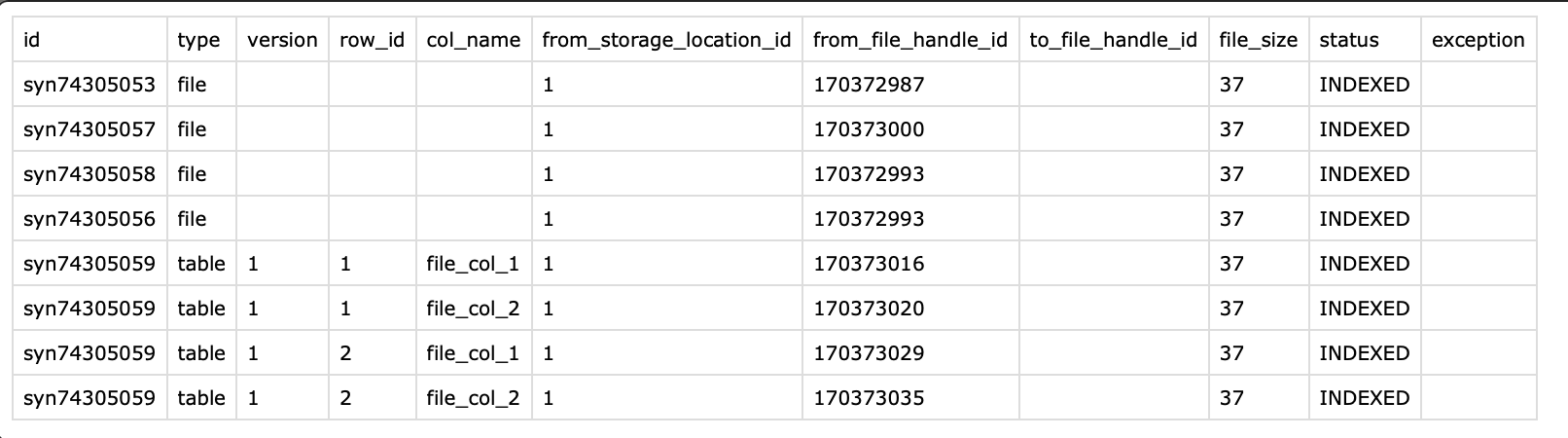
After migration, inspect the results CSV for status details and any errors. Detailed tracebacks are saved in the exception column of the CSV:

Source code for this tutorial
Click to show me
"""Tutorial code for Index and migrate files to the new storage location"""

import synapseclient
from synapseclient.models import Folder, Project

syn = synapseclient.login()
my_project = Project(name="My uniquely named project about Alzheimer's Disease").get()
MY_S3_STORAGE_LOCATION_ID = "1234567890"
# WARNING: This will actually migrate files associated with the project/folder.
# Run against a test project first and review the index (MigrationResult) before
# migrating production data.
my_migration_folder = Folder(
    name="my-data-migration-folder", parent_id=my_project.id
).get()
index_result = my_migration_folder.index_files_for_migration(
    dest_storage_location_id=MY_S3_STORAGE_LOCATION_ID,
    db_path="/path/to/your/migration.db",
    include_table_files=False,  # Set True if you also want table-attached files
)
index_result.as_csv("/path/to/your/index_results.csv")
print(f"Migration index database: {index_result.db_path}")
print(f"Indexed counts by status: {index_result.counts_by_status}")

migrate_result = my_migration_folder.migrate_indexed_files(
    db_path="/path/to/your/migration.db",
    continue_on_error=True,
    force=True,  # Skip interactive confirmation for tutorial purposes
)
migrate_result.as_csv("/path/to/your/migrate_results.csv")
if migrate_result is not None:
    print(f"Migrated counts by status: {migrate_result.counts_by_status}")
else:
    print("Migration was aborted (confirmation declined).")
References used in this tutorial
- Folder
- Project
- FailureStrategy
- [MigrationResult][synapseclient.models.services.MigrationResult]
- syn.login
- Custom Storage Locations Documentation
See also
- Storage Location Tutorial — How to create and manage storage locations
- Storage Location Architecture — In-depth architecture diagrams and design documentation